Choose your screen dimensions, compare crop and fit, then export a wallpaper that keeps the composition you want. Free, with no sign-up.
16:9
Live preview follows the selected ratio.
The short answer
What ratio should a desktop wallpaper be?
Match the wallpaper to your display’s native pixel dimensions. 1920 × 1080 and 3840 × 2160 are both 16:9. A 3440 × 1440 ultrawide is exactly 43:18, not exactly 21:9. There is no single ratio that fits every desktop, phone or monitor.
Use the planner below to compare a centered crop with a full-image fit. Pick your own screen size rather than guessing from the diagonal size in inches.
Enter the screen’s native resolution. These are example presets, not device detection.
2. Add your image — optional
Choose a JPG, PNG or WebP (up to 25 MB and 50 million pixels) for an actual preview and export. The tool reads the selected image in this browser; it does not upload the image. Only use images you have permission to use.
No image selected. The diagram shows how a sample composition changes; source dimensions below are editable.
3. Compare display modes
Crop fills the screen but removes edges. Fit keeps the whole image and may add black space. Stretch fills the screen by changing the shape. This is a centered preview; your operating system may offer other positions.
Crop / FillFitStretch
PNG export needs an image. Maximum output: 32 million pixels, with each side at most 16,384 px. Transparent areas are flattened onto black.
Find the right wallpaper dimensions before you export
Choose the display you are changing. With several monitors connected, check each one separately.
On Windows: open Settings → System → Display and check Display resolution. Microsoft recommends the setting marked Recommended. Display scaling (for example 125%) changes interface size, not the native wallpaper pixel target.
On macOS: open System Settings → Displays and check the selected display’s resolution options. A scaled “looks like” workspace is not necessarily the panel’s native pixel dimensions. Check the display’s specifications if the native size is unclear.
Check image dimensions, not file size alone. Use image information in your file manager or the optional local image picker above. A large file can still have the wrong shape.
Example: a 2400 × 1600 photo on a 1920 × 1080 screen
The photo is 3:2; the screen is 16:9. A centered fill scales the photo to 1920 × 1280, then crops 100 pixels from the top and bottom of that scaled image. Fit instead scales it to 1620 × 1080, leaving 150 pixels of black space on each side. Stretch makes it 1920 × 1080 without preserving the original shape.
Ultrawide and dual-monitor wallpaper
Use 3440 × 1440 for that exact ultrawide panel: its ratio simplifies to 43:18. “21:9” is a market category, not an exact description of every ultrawide screen. Two 1920 × 1080 displays aligned side by side form a 3840 × 1080 pixel rectangle (32:9) if the desktop uses those native resolutions.
For different heights, rotated screens or mixed scaling, use the actual arranged desktop bounds, not just the sum of two widths. A separate wallpaper for each display is often easier. This planner exports one rectangular image; it does not detect your monitor arrangement or perform bezel correction.
Choose a ratio, enter width or height, and the calculator fills the matching dimension while keeping the image or video proportional.
Simplified ratio16:9
Decimal1.7778
Current size1920 x 1080
Common wallpaper sizes and exact ratios
These are examples, not a universal standard. Choose the pixel size for your own display and check the wallpaper preview on the device.
Use case
Pixel size
Ratio
Full HD desktop
1920 x 1080
16:9
4K desktop
3840 x 2160
16:9
Phone wallpaper
1170 x 2532
195:422
Ultrawide
3440 x 1440
43:18
Generated Size Table
The table below updates when you choose a new ratio. It is useful for planning responsive images, thumbnails, and video exports.
Width
Matching height
Size
Practical Tips
Use a sharp original with enough pixels for the crop; enlargement cannot restore detail.
Keep important subjects away from edges and lock-screen overlays.
Use separate exports for different displays and phones.
Frequently Asked Questions
What aspect ratio is best for desktop wallpaper?
The best ratio matches your own display. 1920 × 1080 and 3840 × 2160 are 16:9; 3440 × 1440 is exactly 43:18. Check the native resolution before choosing a preset.
Why does my wallpaper crop, stretch or show black bars?
The source image and screen have different shapes. Fill crops edges, Fit keeps the image with unused space, and Stretch can distort it. Compare those modes above before exporting.
Why is a high-resolution wallpaper still blurry?
A large pixel count does not guarantee sharp detail. Heavy cropping can leave too few source pixels, and enlargement, compression or an already-soft original can reduce clarity. Start with a sharp original and use the display’s native dimensions; exporting a larger PNG does not restore missing detail.
Can I use one wallpaper across two monitors?
Yes, if your system supports spanning and the image matches the arranged desktop. Two aligned Full HD displays can use 3840 × 1080. Mixed resolutions, scaling or portrait orientation may need different bounds or separate wallpapers.
Should phone wallpaper use the same ratio as desktop wallpaper?
Usually not. Match the phone’s own portrait resolution and check the lock-screen preview. Keep faces and important text away from clock areas and edges that the device may crop.
Does this tool upload my photo or save it for later?
The image picker decodes the selected file in your current browser tab for preview and PNG export. This tool does not send that image to a server or save it in browser storage. Clear the image or close the tab when finished; exported files remain wherever your browser saves downloads.
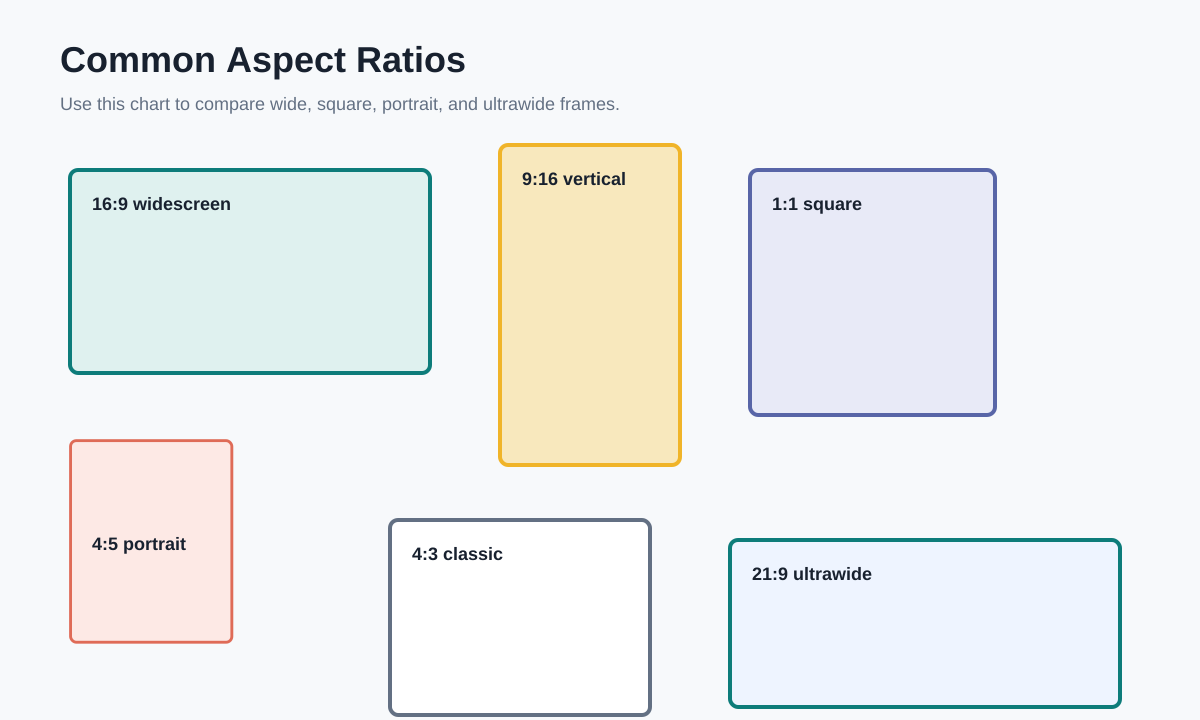
Visual Ratio Reference
This reference chart shows how common frames compare. Use it when deciding whether a creative should be wide, square, portrait, or ultrawide.